The regional alternative to Zapier.

Build multi-step automations without exporting the trigger, payload, queue, run state, and logs to a global workflow cloud. Boundry runs the workflow inside the project’s selected region.
  • Automations · Product preview
  • Sydney · ap-southeast-2 · live
  • Region fixed to the project
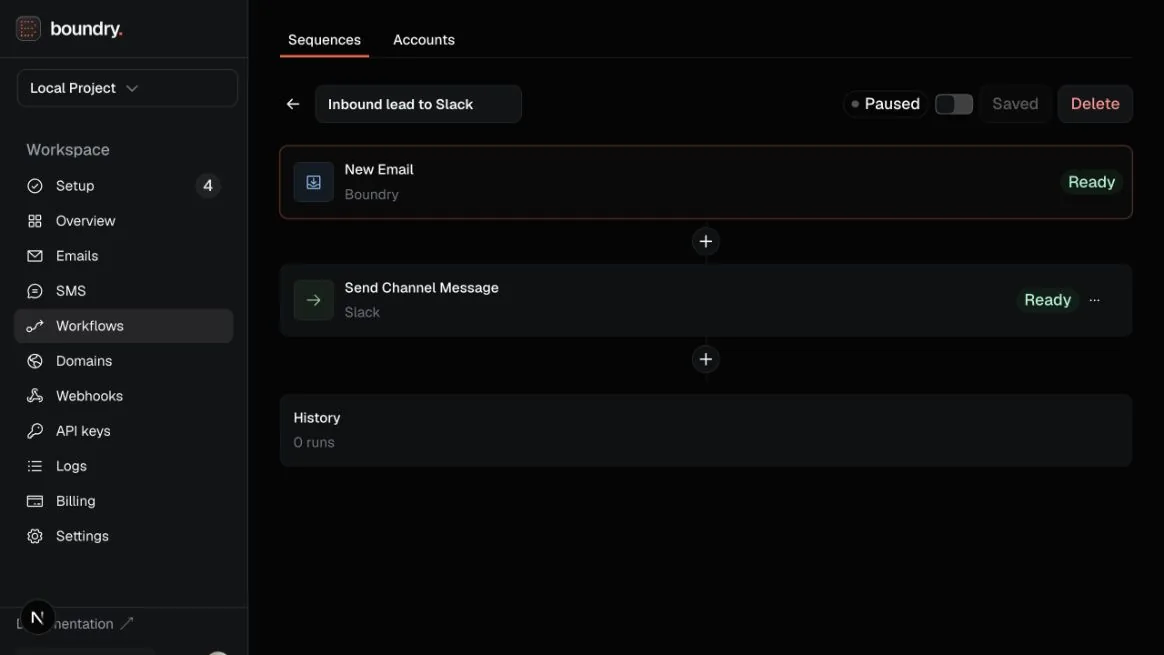
Boundry workflow editor showing an inbound email trigger connected to a Slack channel action.

Automation is part of your data architecture.

Zapier-style convenience should not create an offshore exception. Boundry keeps the workflow’s operational data attached to the same regional project as the system that produced it.

Trigger from real events.

Start from an available regional event, then bind the exact project resources and connections each step may use.

Build complete sequences.

Send email, post to Slack, call any HTTP endpoint, filter a run, delay the next action, and map values from earlier steps.

Test before enabling.

Test connections and individual steps against controlled input. Required fields, connections, and checks gate activation.

Inspect every run.

See what triggered the workflow, which configuration ran, what each action returned, and exactly where a failure stopped it.

Connect any API.

Use generic webhooks with encrypted bearer-token or HTTP Basic credentials when a dedicated app is not in the catalog yet.

Publish signed apps.

Build reusable connectors with declared permissions, versioned packages, review gates, and a constrained regional runtime.

Same automation model. A different boundary.

Choose the architecture before the workflow starts moving sensitive data.

QuestionGlobal automation cloudBoundry
Where does it execute?Vendor-selected infrastructureThe project’s fixed region
Where are run logs?The provider’s global productThe regional project
Can the region drift?Depends on the providerNo. A new region means a new project.
Can you inspect failures?YesYes, step by step

Connected providers receive the data you deliberately send to them. Boundry account identity, project directory information, and encrypted connection coordination remain in the central control plane; workflow execution data stays in the project region.

Browse workflow templates

Questions before you move a workflow onshore.

Where does a workflow actually execute?
Inside the project’s fixed region, not vendor-selected infrastructure. A new region means a new project, so the boundary can’t drift the way it can with a provider that chooses infrastructure for you.
Can I inspect a failed run?
Yes, step by step: see what triggered the workflow, which configuration ran, what each action returned, and exactly where a failure stopped it.
What happens to account identity and connection credentials?
Boundry account identity, project directory information, and encrypted connection coordination remain in the central control plane; workflow execution data stays in the project region.
Is Automations ready to depend on today?
It’s a product preview: Sydney is the first live region, and required fields, connections, and checks gate activation before a workflow can run.

Built for regulated environments.

Read the evidence before you commit. Workflow execution data stays in the project region; account identity and encrypted connection coordination stay in the central control plane, and both facts are written down.

Read the Sydney manifest
  • Sydney · ap-southeast-2
  • Region fixed at creation
  • Subprocessors documented
  • Security evidence published
Region manifest
Ingress, storage, processing, delivery events, webhooks and deletion, mapped end to end for the Sydney region.
Subprocessors
Every third party in the path, and what each one sees.
Security
What is verified in code, what is observed in operation, and what is still unproven.

Move one real workflow onshore.

Sydney is the first live boundary. Open a project, connect Slack or an API, and test the complete sequence before you turn it on.

npm i boundry-sdk
Open Automations